
Backend Architecture
The TriPay application follows a monolithic architecture built on Laravel framework with Vue.js for frontend interactivity. This architecture combines the traditional MVC (Model-View-Controller) pattern with modern frontend components and service layers for better separation of concerns.
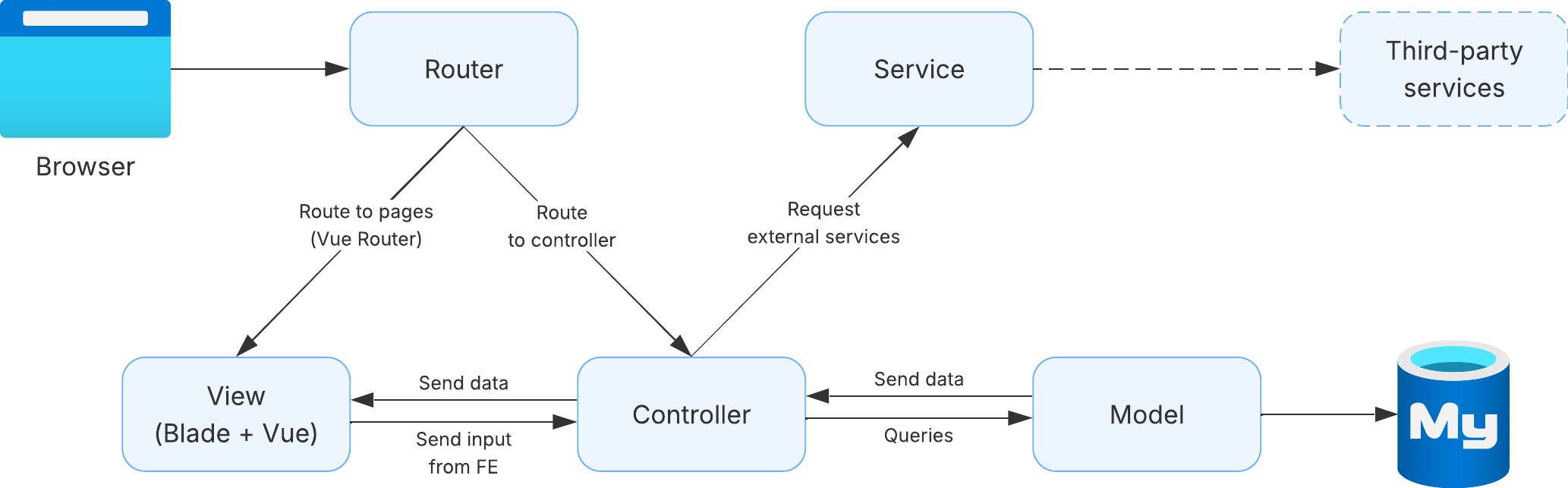
Component Details
1. Browser
The entry point where users interact with the application through web browsers. All HTTP requests originate from here and responses are rendered back to the user.
2. Router
Laravel's routing system that acts as the traffic controller for all incoming requests. Use Laravel Mix with Vue Router 2 for frontend routing.
a. Route to Pages (Vue Router)
- Handles frontend navigation
- Used for user-facing pages (dashboard, transactions, settings, etc.)
- Example:
admin/dashboard,admin/transactions,member/merchant,member/withdraw
b. Route to Controller
- Handles API requests and form submissions
- Directs requests to Controller for processing
- Used for data manipulation and business logic
- Example:
/api/transaction/create,/api/merchant/update
3. View (Blade + Vue)
The presentation layer that combines Laravel Blade templating with Vue.js components.
a. Blade Templates
- View for static front pages.
- Provides SEO-friendly content
- Examples:
/,/about-us,/terms-and-conditions,developer, etc. - Located in
resources/views/
b. Vue.js Components
- View for dashboard Admin, Member, and Simulator
- Use client-side interactivity
- Build and compiled using Laravel Mix
- Examples:
admin/dashboard,admin/transactions,member/merchant,member/withdraw - Located in
resources/js/
4. Controller
The orchestrator that handles HTTP requests, processes business logic, and coordinates between different layers.
5. Service
A dedicated layer for complex business logic and external service integrations.
Use Cases:
- Payment provider integrations
- Email service (Amazon SES)
- File storage (Amazon S3)
- WhatsApp notification service
- Analytics tracking
- KYC verification (Verihubs, Gemini)
6. Model
The data layer that represents database tables and handles data operations using Laravel's Eloquent ORM.
7. Database (MySQL)
The persistence layer where all application data is stored.
Database Structure:
- Relational database management system
- Stores user data, transactions, settings, logs
- Ensures data integrity and consistency
- Handles concurrent access
Key Tables:
users- User accounts and authenticationmerchants- Merchant profiles and configurationstransactions- Payment transaction recordschannels- Available payment channelswithdrawals- Withdrawal historyfees- Transaction fee configurationslogs- System and activity logs
8. Third-Party Services
External services integrated into the application for extended functionality.
Integrated Services:
- Payment Providers
- BCA, BNI, Neo, NOBU, Prismalink
- DurianPay, LinkQu, Esmartlink, PakaiLink
- Purpose: Process payments and settlements
- Email Service
- Amazon SES
- Purpose: Transactional email delivery
- Storage Service
- Amazon S3
- Purpose: File storage and backups
- Analytics
- Google Analytics, Microsoft Clarity, PostHog
- Purpose: User behavior tracking and analytics
- KYC Services
- Verihubs, Gemini
- Purpose: Identity verification
- Messaging
- WhatsApp API
- Purpose: Customer notifications
- Automation
- n8n
- Purpose: Workflow automation
- Reporting
- Metabase
- Purpose: Data analytics and dashboards
Request Flow
Page Request Flow
Browser → Router → View (Blade + Vue) → Browser
- User accesses a page URL
- Router receives the request
- Router directs to appropriate View
- Blade template renders with Vue components
- Response sent back to Browser
API Request Flow
Browser → Router → Controller → Service/Model → Database
                      ↓
                   Response ← Service ← Third-party
- User performs an action (form submit, button click)
- Browser sends API request
- Router directs to appropriate Controller
- Controller validates request
- Controller calls Service (if needed) or Model
- Service may call Third-party services
- Model executes database queries
- Response travels back through Controller to Browser
Data Submission Flow
View (Frontend Input) → Controller → Service → Model → Database
                                       ↓
                              Third-party Services
- User fills form in View
- Vue component sends data to Controller
- Controller validates input
- Controller delegates to Service (if complex)
- Service/Controller uses Model for database operations
- Service may interact with Third-party services
- Success/error response sent back to View
Design Patterns
1. MVC Pattern (Model-View-Controller)
- Model: Data and business logic
- View: Presentation layer
- Controller: Orchestrates Model and View
2. Service Layer Pattern
- Separates business logic from controllers
- Promotes code reusability and testability
3. Repository Pattern
- Models act as repositories for data access
- Abstraction over database operations
4. Dependency Injection
- Laravel's service container handles dependencies
- Promotes loose coupling and testability
Best Practices
Controller Guidelines
- Keep controllers thin and focused
- Validate requests using Form Request classes
- Delegate complex logic to Services
- Return consistent response formats
- Use resource controllers for RESTful APIs
Service Guidelines
- Create services for complex business logic
- Make services reusable across controllers
- Handle third-party integrations in services
- Write unit tests for service methods
- Use dependency injection for service dependencies
Model Guidelines
- Define relationships clearly
- Use scopes for reusable queries
- Implement accessors/mutators for data transformation
- Add validation rules in model or Form Request
- Use model events for automated actions
View Guidelines
- Keep Blade templates clean and simple
- Use Vue components for interactive elements
- Separate concerns between Blade and Vue
- Implement proper data binding
- Optimize component rendering
Security Considerations
- Input Validation: All user inputs validated in Form Requests
- CSRF Protection: Laravel's CSRF tokens for form submissions
- SQL Injection Prevention: Eloquent ORM prevents SQL injection
- XSS Protection: Blade templating auto-escapes output
- Authentication: Laravel Sanctum/Passport for API authentication
- Authorization: Policies and Gates for access control
- Rate Limiting: Throttling for API endpoints
- Secure API Keys: Environment variables for sensitive data
Performance Optimization
- Query Optimization: Use eager loading to prevent N+1 queries
- Caching: Implement Redis/Memcached for frequently accessed data
- Queue Jobs: Background processing for time-consuming tasks
- Database Indexing: Proper indexes on frequently queried columns
- Asset Optimization: Minification and bundling of JS/CSS
- CDN Usage: Serve static assets via CDN
- Database Connection Pooling: Reuse database connections
Conclusion
The TriPay architecture combines the robustness of Laravel's MVC pattern with modern Vue.js frontend capabilities, creating a maintainable and scalable monolithic application. The addition of Service layer provides better separation of concerns, making the codebase more organized, testable, and easier to maintain as the application grows.